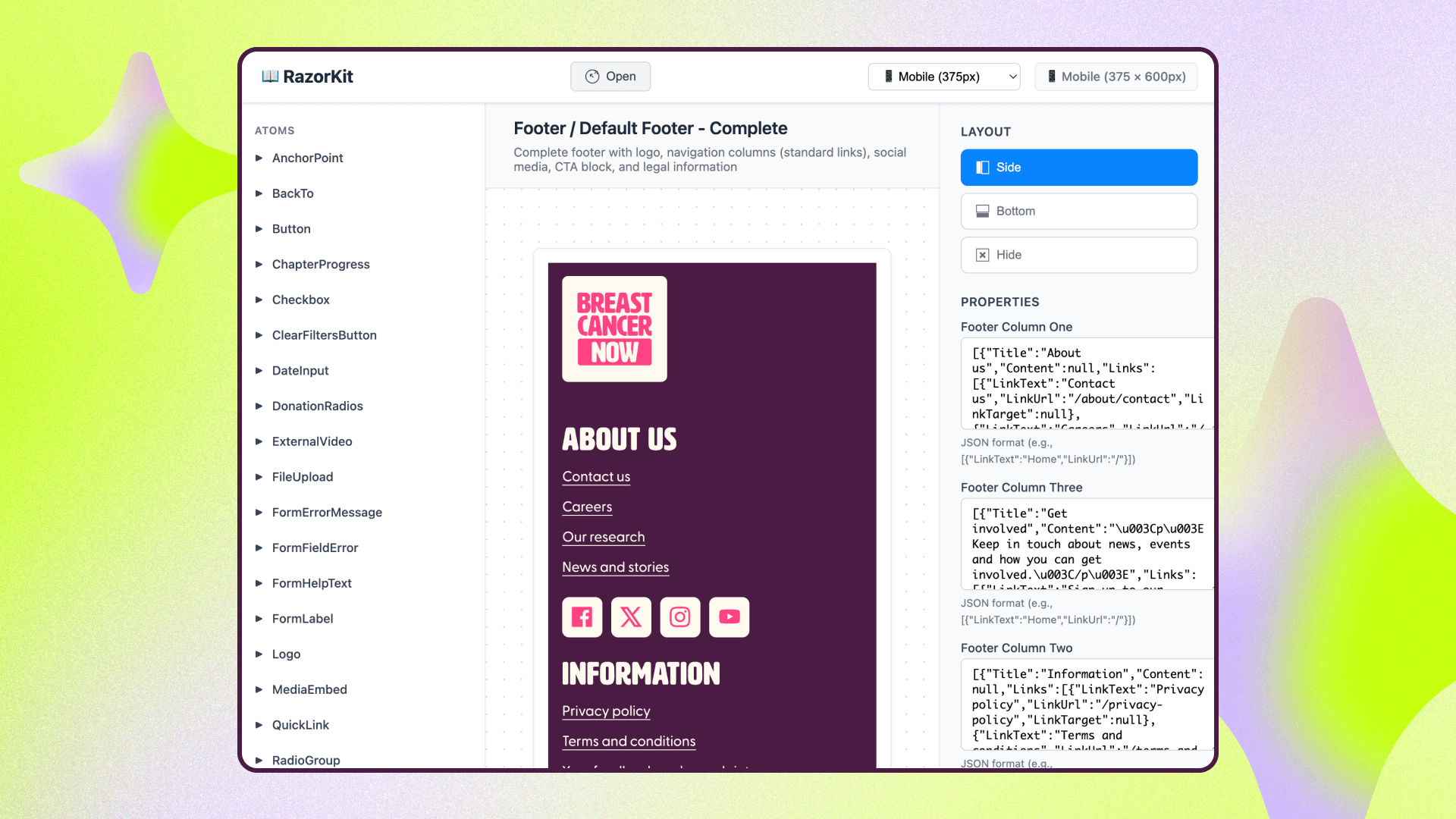

Introducing RazorKit! RazorKit brings component-driven, design-system thinking to Umbraco, allowing teams to build faster and maintain cleaner codebases by treating UI components as the single source of truth. This post defines RazorKit, outlines the problems it solves in traditional CMS-led workflows, and details how it provides a maintainable, architecture-first approach to building front-ends in .NET.
There's a moment every Umbraco team knows well. The designs land in Figma. They're clean, considered, and built from a tidy set of reusable patterns such as buttons, cards, accordions, a few signature layouts. Everyone nods.
And then development begins, and that tidy system slowly comes apart.
The buttons get rebuilt three times in three slightly different ways.
A spacing tweak that should take a minute takes an afternoon because the same markup lives in five templates.
Someone updates a component in Storybook, but the change never makes it across into the actual site, or a change on the site isn’t reflected in the design system.
By launch, the elegant design system has become a hassle that nobody fully trusts.
Introducing RazorKit
Manifesto built RazorKit, initially in collaboration with Breast Cancer Now (the UK's leading breast cancer charity), to close that gap.
RazorKit is an open-source approach with a smart tooling set that lets you build Umbraco front-ends in the way designers think, frontenders work and reduce any backend burden to as low as possible.
It’s designed as a system of reusable components, tightly coupled to the design rather than to any specific CMS.
This article explains what RazorKit is, the problem it solves, and who it's for.
The CMS shouldn't dictate your front-end
Most content management systems ship with an opinion about how your front-end should be structured.
They give you a theme system, a set of template conventions, and a strong gravitational pull toward doing things "the CMS way."
That sounds helpful, and for simple sites it is. But it creates a quiet tension. Designers don't think in content types and block lists, they think in components.
A button is a button wherever it appears. A card is a card. They design a pattern library in Figma that's organised around the user experience, and they, rightly, don't much care which CMS it eventually lives in.
The traditional workflow forces a translation step between those two worlds, and translation is where things break:
-
Duplicated effort: Teams often build components once in a tool like Storybook, then rebuild them again inside the CMS templates. Every ticket effectively gets done twice.
-
Drift: Because the two copies aren't linked, a change in one place silently fails to appear in the other. The "single source of truth" turns out to be two sources that disagree.
-
Manual, error-prone hand-offs: Copying HTML out of a design tool and wiring it into CMS templates by hand is exactly the kind of repetitive work where mistakes creep in.
-
Cognitive overload: When the code for a single component is scattered across templates, partials, stylesheets, and scripts, a developer has to hold the whole site in their head just to change one small thing safely.
None of this is anyone's fault. It's the natural result of letting the CMS's structure, rather than the design system's, drive how the front-end is organised.
This isn't a new observation, either. Back in 2014, Ian Feather wrote about exactly this problem at Lonely Planet: once a developer copies a component's markup, they've effectively cut a version that has to be maintained forever, with an implicit link to a snapshot of the styling at that moment. The authors of a component often have no idea where it's being used, so updating it becomes risky, people avoid it, and technical debt quietly builds up.
Anyone who's worked on a template-based CMS will recognise the pattern immediately.
For Umbraco, RazorKit is our answer to it.
What is RazorKit?
RazorKit flips the relationship around.
Instead of building your front-end for Umbraco, you build it around your design system, and RazorKit provides the bridge that connects those components up to the Umbraco CMS.
Under the hood it uses Razor Class Libraries, a standard .NET mechanism for packaging up views, assets, and logic into a self-contained, reusable library.
RazorKit isn't a bolt-on framework fighting against the platform. It's a clean way of using something .NET already supports well, applied deliberately to solve the design-to-CMS problem.
In practice, that means we can build the UI the way component driven teams everywhere already do. With small pieces composed into bigger ones.
For those familiar with Brad Frost's Atomic Design principles, this allows the development of:
-
Atoms: the smallest building blocks, like a button or an input.
-
Molecules: small combinations, like a labelled search field.
-
Organisms: larger, meaningful sections like an accordion, a feature block, or a header.
We've always found Pattern Lab, a tool that sits alongside the Atomic Design method, a little heavier than we like.
What RazorKit does is take the methodology and make it natural to implement inside an Umbraco solution, without the weight. You code a button once, give it the right properties, and reuse it everywhere. Update it in one place, and every component that uses it updates too.
Each component now lives in one place.
Its markup, its styling, its interactions, and its accessibility considerations all sit together.
When we want to work on something, we open one folder and we’re confident we won't break anything else.
That's the reduction in cognitive load that makes day-to-day development calmer, faster and more enjoyable.
How to get Storybook-style previews, without leaving Umbraco
One of features of RazorKit is that you can view and test components in isolation, much like Storybook, but inside your Umbraco solution rather than in a separate environment.
You can navigate to a component, see exactly how it looks and behaves on its own, and adjust its properties to test different states. For example, to swap content, lengthen the text to check it doesn't break, toggle between themes.
For quality assurance, that's pretty neat, you can confirm a component is flexible and responsive before it ever touches a real page.
And because it's all within the one solution, there's no second environment to keep in sync. The thing you preview is the thing that ships.
The architecture: a sensible halfway house
If you've worked in a modern front-end, you might be asking: why not just go fully headless using frameworks like React or Next.js talking to the CMS over an API?
That fully decoupled approach has real strengths, chiefly that your front-end becomes almost entirely agnostic to the backend. It is a step further than RazorKit.
But, it comes at a cost.
Two separate applications, a more complex hosting setup, and more moving parts to maintain.
RazorKit is a sensible halfway house.
You keep a single, monolithic Umbraco application, simple to host and operate, but you still get the headline benefit of decoupling: your design system is built in isolation from the CMS layer. The front-end team doesn't have to wrestle with the specifics of the CMS implementation, and the design system isn't held hostage by the platform's theme conventions.
You get the separation of concerns without the distributed-systems overhead.
For a lot of teams and projects, that's exactly the right trade-off.
Who is RazorKit for?
RazorKit grew out of our own needs as an agency.
Working across many clients, the cost of inconsistency and duplicated effort is multiplied, so the payoff from a shared, component-driven approach is large.
We've seen it let us onboard developers onto projects quickly and reuse granular components across builds rather than reinventing them each time.
But it isn't agency-specific. RazorKit is recommended for:
-
Agencies building multiple Umbraco (or .NET) sites who want consistency and speed across projects.
-
In-house teams maintaining even a single website who want a design-system-led workflow rather than a CMS-led one.
-
Any .NET-oriented organisation that might build several applications and would benefit from a shared pattern library sitting behind them.
If you’re looking for Umbraco development and support from a team that uses RazorKit in production, we'd love to talk.
A note on consistency (and AI)
If there's one principle underneath all of this, it's that consistency wins. The biggest gains don't come from any single clever feature, they come from doing things the same way every time, so that knowledge, components, and patterns transfer between projects and people.
That consistency pays dividends with AI tooling.
Component-driven, predictable structure is exactly what AI coding agents are good at working with, it mirrors how the wider JavaScript and React ecosystems are organised, so agents recognise the patterns and can scaffold new work that fits.
Open source, and yours to build on
RazorKit is open source under the MIT licence.
We chose that deliberately, the most permissive option we could, so there's never any ambiguity about ownership or what you're allowed to do with it. It's genuinely given away.
That also means it's yours to extend. If you try it and find it's missing something, the repository is public and contributions are welcome.
If this resonates, the best next step is to take a look at the project on GitHub, give it a star, and try it on your next build.
We'd love to see what you do with it — and what you add to it.
https://github.com/Manifesto-Digital/RazorKit
RazorKit is an open-source project from Manifesto.
Further reading
If you want to go deeper on the thinking behind component-driven development and the trade-offs we weigh as architects, these are well worth your time:
-
A Maintainable Style Guide — Ian Feather, Lonely Planet. A clear-eyed account of why copied component markup turns into technical debt, and the case for treating the component layer as the single source of truth.
-
Atomic Design — Brad Frost. The talk that popularised the atoms/molecules/organisms approach. Frost describes the problems in web development particularly well (even if we find his Pattern Lab tooling heavier than we'd choose).
-
Simple Made Easy — Rich Hickey. A foundational talk on the difference between simple and easy, the distinction we keep returning to when making architectural decisions like the one behind RazorKit.
Read next
AI won’t replace junior engineers. But it might stop them becoming great ones.
by Rowan Blackwood19/05/2026Why AI might hinder junior engineer growth - and a mentoring tool that can help.

From prompt to prototype: my journey using AI to build a Self Serve tool
by Alan Sparkes12/08/2025Designer, Alan Sparkes tested AI tools to see if and how they could support the design process.

Making AI work for purpose-led organisations
by Antony Haddley, Cherie Chambers18/05/2026Stuck on AI? Discover how purpose-led teams break the deadlock and deliver mission-driven impact.